Windows Update Module - Hide KB
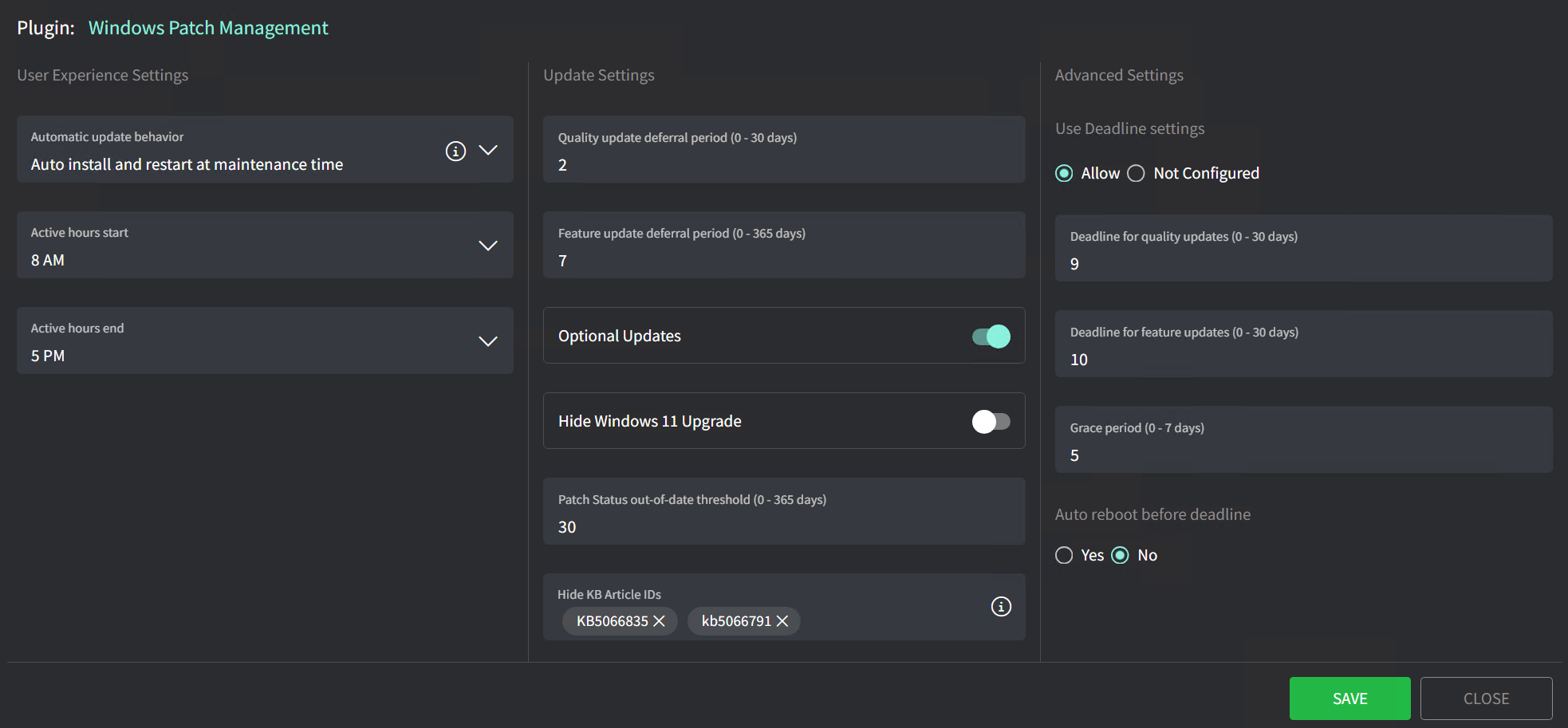
https://help.gorelo.io/articles/7366391-windows-patch-management - Hide KB items do we include "KB" e.g KB5066835 or do we just put the KB numbers?

@everyone 📰 **Release Notes 2026-11-06** 📱 **Docs for Gorelo Mobile — Your whole knowledge base, wherever the job is** Docs are now in Gorelo Mobile so no more reaching for a laptop. Browse docs by client with your starred and recent docs up top, or open them straight from a client’s Documents tab. The editor handles everything the web app can write, from callouts and toggles to tables, task lists, image carousels and record links. The ⋯ menu covers the rest: copy a link, publish to the Portal, move, duplicate, archive a doc, or restore an earlier version from its history. Structured Documents are in too, so you can add and edit entries with every field type, and you can link assets, contacts and other docs to any doc. Edits save when you tap Save, and if someone else changed the doc in the meantime, you’ll be asked before anything is overwritten. ✨ **API **- New POST /v1/contracts and PATCH /v1/contracts/{contractId} to create and update contracts, including service lines, line items and block hours. On PATCH, service lines and line items are matched by Id and replace the existing set, and StatusId 3 archives a contract (1 restores it) ✨ **Assets **- AV1 is now the default video codec for Gorelo Connect, for sharper text at less bandwidth. Sessions stay on H.264 when the device or a browser can’t handle AV1 ✨ **Assets **- Direct peer-to-peer (P2P) Gorelo Connect sessions now send your mouse and keyboard over the direct connection too, not just the picture, so control feels faster. If the direct link drops, input falls back to the relay on its own and goes direct again after a reconnect ✨ **Integrations **- Connecting Xero or QuickBooks Online is now faster and more reliable ✨ **Invoices **- Deleted draft invoices can now be restored from the new Invoices tab in the Recycle Bin (drafts deleted in the last 90 days). Manual and contract lines come back with the invoice, while ticket and task time and products stay in Waiting to Invoice so nothing is billed twice, and restored drafts sync to Xero or QuickBooks automatically ✨ **Messenger **- AI now automatically tags new Messenger tickets and assigns their ticket type ✨ **Messenger **- Tickets and replies from signed-in contacts now get a sentiment score, just like email, so they count toward the client’s average sentiment and negative-sentiment alerts ✨ **Portal **- End-user remote access is now a simple On/Off toggle on the contact. Their primary assets are always included, and you can add more computers one at a time or by asset tag, which also picks up assets tagged later ✨ **Portal **- Remote access now switches off automatically when a contact moves to another client or is inactivated, archived or merged, and every change shows on the client and contact timelines 📱 **Mobile **- Security improvements for remote sessions started from the app 🐛 **Approve & Invoice** - Fixed an issue where a time entry’s description could disappear after changing its work type, billing role, contract or user 🐛 **Assets **- Fixed an issue where Gorelo Connect showed the first frame and then froze in browsers that block autoplay, such as Firefox. Your first click or key press now resumes the picture, or use the new Resume picture button 🐛 **Assets **- Fixed an issue where the bottom of the ⋯ menu in Gorelo Connect was cut off on shorter windows. The menu now scrolls inside the window instead 🐛 **Assets **- Fixed an issue where new or renamed asset tags didn’t show up in other open tabs until the page was refreshed 🐛 **Xero **- Fixed an issue where the Chart of Accounts and Tax Code dropdowns could be empty right after connecting Xero https://feedback.gorelo.io/changelog/release-notes-2026-11-06 👇 Docs on mobile 👇
Mikel · 6d ago
@everyone 📰 **Release Notes 2026-10-30** 📱 **Projects & Tasks for Gorelo Mobile — Run a project end to end from your phone** Projects are now in Gorelo Mobile. Browse, search and filter your projects with the same saved views as the web app, or start a new one. Open a project to update its details, work through its tasks by status or section, and keep everyone in the loop with comments, replies and @mentions. Tasks come with checklists, approvals, conversations, time entries and timers, and project and task notifications now open straight into the project or task. ✨ **Assets **- Gorelo Connect sessions can now switch to the AV1 video codec for a clearer picture at the same bitrate (Windows and macOS; the session stays on H.264 if the device or a viewer can’t use AV1). AV1 can also be set as the default codec on the plugin itself. ✨ **Assets **- In full screen, Gorelo Connect now sends shortcuts like the Windows key, Win+R and Alt+Tab to the remote device instead of your own computer (Chrome and Edge only; hold Esc for 2 seconds to exit full screen) ✨ **Assets **- New Send keys bar in Gorelo Connect, turned on from the ⋯ menu, with sticky Ctrl, Alt, Shift and Win keys, plus Esc, Tab, Del, PrtScn, F1–F12 and a shortcut picker. It works in any browser and in Gorelo Mobile ✨ **Clients **- Client custom fields now hold up to 2,500 characters (up from 2,000), including through the API ✨ **Huntress **- Huntress status is now shown for every asset on both the list and detail page. ✨ **Huntress **- With auto-mapping turned on, new clients are now matched to the Huntress organization with the same name, or one is created in Huntress straight away rather than after the first agent install. Renaming a client also renames its Huntress organization (existing mappings aren’t changed) ✨ **Huntress **- Huntress alerts now clear themselves. When a health check finds Huntress running on a device, its open Huntress alerts are dismissed automatically, and configuration alerts clear once the configuration is fixed ✨ **Integrations **- New integration logs show when a Huntress or Slide action fails, from Huntress organization syncs to Slide backups, pairing, connections, device actions and configuration pushes. Open them from Logs on the integration ✨ **Messenger **- Contacts can now be automatically created if the domain belongs to one of your clients ✨ **Settings **- Users in Gorelo can now go by a nickname with client communication such as email and the Messenger ✨ **Tasks **- Task approvals now work like ticket approvals. Add a name and approvers, then write the request in the regular comment editor, Shortcuts included. Approvers are emailed once the request is posted Full release notes with API changes and bug fixes here:https://feedback.gorelo.io/changelog/release-notes-2026-10-30 👇👇👇 Projects on mobile
@everyone 📰 **Release Notes 2026-10-23** 📱 **Terminal for Gorelo Mobile — A live command line in your pocket** You can now open a live shell on any online Windows or Mac device from your phone. Tap Terminal on a device and you get a live PowerShell, Command Prompt or macOS shell, with output streaming back as each command runs. From the menu you can switch shells or run as the logged-in user. You can also answer interactive prompts and tap Stop to send Ctrl+C. The </> button runs your pinned scripts, variables and all. Every command is logged to the device’s Activity, just like on web. 🦄 **Portal **- End users can now remote into their own assigned computers. Turn on “Can access assets” on a contact to get set up. We’re wiring up the portal side of things now, so end users will see it there in the coming days. It’s free while Connect v2 is in testing and we gather feedback. ✨ **Assets **- Gorelo Connect sessions on macOS now sharpen the picture when the screen is still ✨ **Assets **- Gorelo Connect on multi-monitor machines now allows you to pop any remote monitor out into its own window, on both Windows and Mac ✨ **Assets **- Quick Connect now supports Connect v2 ✨ **Assets **- The Live Terminal now replaces the legacy CLI for all assets across Gorelo that support it (Windows and macOS) ✨ **Invoices **- Brand-new invoice PDF design with cleaner line alignment, struck-through discounted prices, page numbers, and your brand colour. This is currently optional and can be configured via your invoice template. ✨ **Messenger **- On the initial message screen, Enter key now adds a new line and there’s a more deliberate Submit button ✨ **Messenger **- New “Guest messages” toggle in the Messenger plugin to allow or block messages from people who aren’t signed in, with an option to require an email address 📱 **Mobile **- Each banner type now has its own icon, and banners on Asset Detail are grouped into one pill 📱 **Mobile **- Email alerts now have a “View original” link to open the source email 📱 **Mobile **- iOS users can choose Apple Maps or Google Maps in Settings 📱 **Mobile **- Swipe down on search results to hide the keyboard 📱 **Mobile **- Tap the client or asset name on an alert to jump straight to it ✨ **Products **- Sync product or bundle changes to multiple contracts at once with multi-select or Select All ✨ **API **- Agent and custom assets now share their fields: DisplayName, Type, SerialNumber, ContactId and Banner on agents, and Manufacturer, Model and WarrantyStartDate on custom assets. There’s also a new GET /v1/assets/types ✨ **API **- Alerts now return AgentAssetId, CustomAssetId and UptimeId, with matching filters. DeviceId and UptimeCheckId remain as deprecated aliases ✨ **API **- Clients now return GroupIds, which can be filtered on GET /v1/clients and set via PATCH /v1/clients/{clientId} ✨ **API **- GET /v1/documents now supports sortBy=documentOrder, and new documents get UpdatedOn set when they’re created ✨ **API **- New agent endpoints under /v1/assets/agents/{id}: patches, patches/available, apps, tags and hardware ✨ **API **- New GET /v1/assets/scripts and GET /v1/assets/scripts/{scriptId}, which includes the script’s Content ✨ **API **- Tickets now accept a ContactId or CcContactIds contact from another client, matching “Search All Clients” in the app ⚠️ **API **- Agent connection status names now match the app (Online/Offline). The ids haven’t changed, so this only breaks integrations that match on the name text ⚠️ **API **- Documents related item type 4 has been renamed from “Device” to “Agent asset”. The id hasn’t changed Full release notes with bug fixes here: https://feedback.gorelo.io/changelog/release-notes-2026-10-23 👇 Terminal on your phone 👇
Mikel · 2w ago
Mikel · 3w ago